


Download IMR-Bombers Version 1.5 (October 2005)

Want to see Bombers in action? We’ve prepared a short movie encoded in DivX, download here.
Intro
Since 1989 Bomberman has been defined by gamers as the ultimate multiplayer game. IMR-Bombers is a Palm version of the classic Bomberman & DynaBlaster games. The game includes original 2D-Graphics powered by a Palm-Optimized Graphics-Engine. An Artificial Intelligence system makes you blink when one of the three Palm-Driven opponents traps you between explosions and indestructible blocks. Built around four-player matches, games strive to find the perfect balance between playability, depth, and simple fun, a Palm Classic.
The game has the following features:
- Original High Quality Graphics.
- Palm-Optimized Graphics engine which provides a smooth game play at over 20 frames-per-second.
- Highly-Intelligent & Fluent Artificial-Intelligence system that drives computer opponents.
- Up to 4 players (1 Human vs. 3 Palm-Driven Players), each with an individual look and attitude.
- A League System.
- Support for ‘World Wide Widget Works’ GamePad.
Contact / Register
Do you have Questions / Comments / Requests? Is there a power-up you’d like to see in the game? Is there a special-feature you think we should add? Email us at bombers@visual-i.com and make a difference :)
Our website resides here The IMR-Bombers website can be found here
If you wish to register the game, you can do so online at palmgear. Registering the game removes the ‘20 Games’ restriction that apply to the shareware version.
Screens
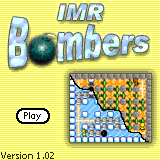
The opening screen:
Click ‘Play’ to start a new game or continue a paused one.
Hit the menu to get to the configuration screen or to get help on how to play the game.
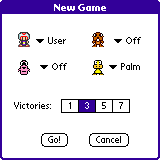
When you start a new game you get the ‘new-game’ screen:
Here you can choose which player You (User) want to be, and against which opponents you wish to play.
You can also choose the length of the League as in ‘Victories’. This means that the first player to earn 1/3/5/7 Victories will be ‘King Of The League’
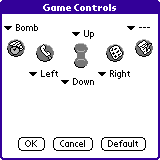
If you choose ‘Configuration’ from the main-menu you get to configure the controls as you like.
The game also supports the WWW GamePad, if such a GamePad is detected a small text will appear under the key-configuration saying ‘GamePad® Driver Detected’.
The initial configuration sets the Up-Down-Left-Right keys to the center buttons (PageUp-PageDown-AdressBook-TodoList). To drop a bomb use the DateBook key.
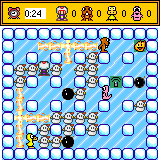
How To Play
Bombers is an easy and fun game to play.
You control one character (Bomberman, Duck, Worm or Beaver). You begin your game in one of the corners armed with 1 bomb  . When you place this bomb on the floor it will tick for 4 Seconds and then explode
  . Your first explosion will be small, it will destroy any Destroyable walls (
 ) within it’s range (unlike indestructible walls
  ) and most importantly eliminate any opponent within it’s radius
  . When you start you will have only one bomb, this means that when you put a bomb on the floor you have to wait for it to explode before you can place another bomb.
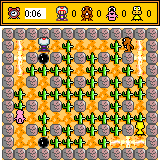
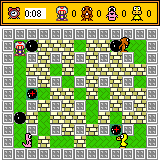
When you start playing your initial target is to ‘clear your path’, you do this by placing bombs at strategic places and taking down destructible walls. Once you’ve cleared your path, you are more free to move around, collect bonuses and eliminate your opponents.
To eliminate an opponent you need to catch him with fire from your or anybody else’s explosion. Most of the game consists of avoiding bombs placed by other players and placing bombs that will eliminate your adversaries.
During the game your player can collect different bonuses that lay under walls. These bonuses show up when you detonate the walls using your bombs. You will usually find bombs when you clear your path to other players.
Bonuses
 The first bonus you’ll encounter is the Extra-Bomb bonus. This will allow you to put a bomb on the floor, and then go and put another one before the first one has exploded. The more extra-bomb bonuses you pick, the more bombs you can spread around simultaneously.
 The next bonus is the Extra-Range bonus. This bonus extends the range of your explosions. You begin with an explosion radius of one, and it will grow by one whenever you pick up this bonus. This allows you to reach opponents that are far away from you and put them in hard-to-escape situations.
Small:
The next bonus is the Extra-Range bonus. This bonus extends the range of your explosions. You begin with an explosion radius of one, and it will grow by one whenever you pick up this bonus. This allows you to reach opponents that are far away from you and put them in hard-to-escape situations.
Small:  , Bigger:
  , Much Bigger: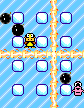
 Remote Detonation comes next. Remote-Detonation is a mode you enter when you pick this bonus up. When you are in Remote-Detonation mode, the bombs you drop will look like this:
  . Your bomb won’t explode after 4 seconds, it will keep ticking until you hit the ‘Drop Bomb’ button again, then they will explode. This allows you to trap opponents at interesting situations where they can’t escape because you can detonate your bomb whenever you want. The shortcoming of this mode is that you can only have one bomb at a time. To get back to normal bomb mode you need to pick up an ‘Extra-Bomb’ bonus ()
 Jumping Bombs are last. Jumping bombs put you in a mode that makes you kick bombs over obstacles instead of just banging into them and not being able to move. Jumping Bombs are experimental at the moment so you may experience unwanted behaviour either logically or graphically, we apologize for this. Jumping bombs will keep on bouncing over obstacles until they land on fresh ground, otherwise they’ll keep on jumping (even across screen-boundaries).

League
When a game ends the League-Screen will show up, It will show you the current winning status for all the participating players.
A line under a trophy indicates that this is the trophy that was earned during the last game.
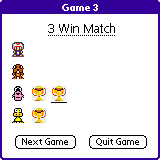
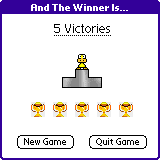
When the league is over, a winner is crowned. This screen shows the winning player, together with the amount of trophies he has earned.
Version History
Version 1.5: October 23rd, 2004
- OS5 devices support added.
- AI opponents are now even better at avoiding bombs.
Version 1.02: January 6th, 2002
- AI: The ‘bomb-avoidance’ code has undergone great changes and improvements, no more semi-suicidal bombers.
- Removed support for devices with less than 16 levels of gray, the game was nearly unplayable with 4 levels of gray, sorry guys.
- Removed support for devices with an OS version lower than 3.5, this is due to the fact that these devices didn’t have enough free-memory
- Changed title-screen text-style and main-logo to avoid resembling Bomberman.
- Reduced Application-Size by 10k.
Version 1.01: December 24th, 2001
- Fixed display error in Victory-Screen.
- Disabled keys in Victory-Screen, this used to cause players to continue hitting keys after winning/losing and thus moving to the basic applications instead of staying in the Victory-Screen.
- Added Small-Icon.
- Changed Registration-Mechanism.
- AI: Improved Remote-Detonation Bomb Avoidance
Version 1.0: December 21st, 2001
- Initial version.
- PalmOS Devices with OS < 3.5: The OS’s implementation of a certain Bitmap Drawing Operation (the winErase Draw-Operation to be precise) has a bug, causing the images of the Players, Bombs and explosions to be blended somewhat incorrectly with their background (the board). We are sorry about this :)
- Handera devices with a Screen Resolution of 320x240: Please go to the Prefs screen, Choose Applications, and choose the mode ‘Center’ for the ‘Bombers’ application. If you don’t do this, the application will be scaled to fit the entire screen, causing it to function extremely slow.